WP Adminify v4.1.1 Plugin
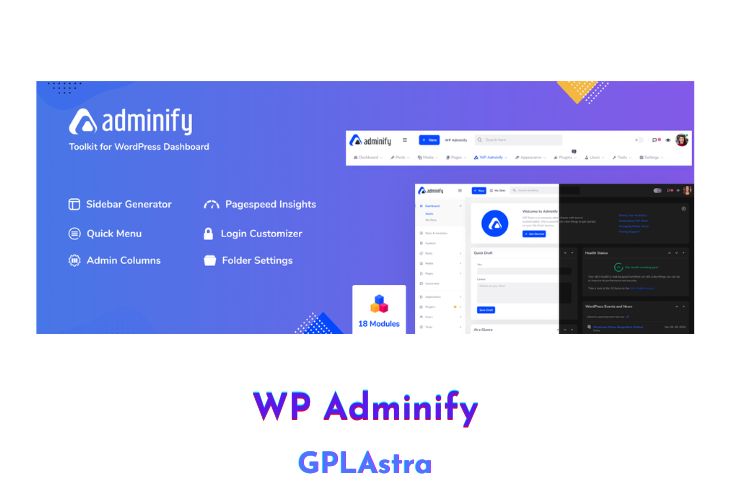
WP Adminify is a powerful plugin designed for WordPress users who want to streamline and organize their dashboard. With this plugin, users can manage and organize the WordPress admin columns into clear, straightforward lists. This enables users to transform their WordPress admin screens into streamlined overviews, making it easier to navigate and manage their website.
One of the standout features of WP Adminify is the Folder module, which allows users to organize all their Pages, Posts, and Media files into folders. This feature is incredibly handy and can be used to organize any post type, including WooCommerce products. With a simple drag and drop functionality, users can move posts or media files into different folders, making it easier to find and manage their content.
The Google Pagespeed Insights module is another powerful feature of WP Adminify. This module helps users to improve the performance of their website by providing suggestions to make a fast webpage. The integrated Google Lighthouse provides even better suggestions for website optimization. Users can browse their history to compare their present and past results and make informed decisions about website improvements.
The Disable Notice module is another useful feature of WP Adminify. This module enables users to stop notices from bothering them at the top of every page in their WordPress dashboard. By getting rid of all the notices, users can focus on content creation and have more space on their dashboard.
| Name | WP Adminify |
| Type | Plugin |
| Version | 4.1.1 |
| File Name | adminify-pro |
| File Type | zip (Installable Archive) |
| File Host | mediafire.com | Mirror |
| Updated On: | 3 weeks ago |
Core Features of WP Adminify Plugin
- Clear and straightforward lists: Users can manage and organize WordPress admin columns into clear and straightforward lists, making it easier to navigate and manage their website.
- Streamlined overviews: WP Adminify enables users to transform their WordPress admin screens into streamlined overviews, which helps to improve website management efficiency.
- Folder module: Users can organize all their Pages, Posts, and Media files into folders with this feature. It supports any post type, including WooCommerce products, and users can drag and drop posts or media into different folders.
- Google Pagespeed Insights: WP Adminify integrates with Google Pagespeed Insights to provide users with suggestions for improving website performance. The integrated Google Lighthouse provides even better suggestions.
- Browsing history: Users can browse their history to compare present and past results and make informed decisions about website improvements.
- Disable Notice module: Users can stop notices from bothering them at the top of every page in their WordPress dashboard, freeing up more space on the dashboard to focus on content creation.
- Admin Menu Editor module: Users can modify their Dashboard menu item name, URL, icon, and change permissions for certain user roles. There are over 2000 awesome icons packed for use.
- Customizable dashboard: WP Adminify provides users with a customizable dashboard, which enables them to modify the appearance and layout to meet their specific needs.
- User-friendly interface: WP Adminify has a user-friendly interface, which makes it easy to navigate and manage the plugin’s features.
- Integration with other plugins: WP Adminify integrates with other popular WordPress plugins, such as WooCommerce, to provide additional functionality.
- Mobile responsiveness: WP Adminify is mobile responsive, making it easy to use and manage website features on the go.
What’s New (Changelog) in WP Adminify v4.1.1
= v4.1.1 (07-02-2026) =
* Fixed: Custom Register URL now properly loads registration form.
* Fixed: Register URL with query strings no longer gets trailing slash appended.
* Fixed: URL generation issue where "http://" was incorrectly added before query parameters.
* Fixed: Multisite registration page now loads correctly with custom register URL.
* Fixed: Login/Logout Redirect fields default values causing PHP undefined array key warnings.
* Fixed: Login/Logout Redirect fields showing incorrect pre-selected values on new entries.
* Improved: New Register URL field placeholder auto-updates based on New Login URL input.
* Improved: Latest Upgrade notice add notify me & don't show again option.
Sales Page and Live Demo of WP Adminify Plugin
https://wpadminify.com/
Free Download WP Adminify Latest Version
⚡ Premium Access
Unlock All Premium Features
Unlimited Downloads
No Restrictions
Direct Download Links
Access to Private Content
Frequently Asked Questions (FAQs):
Here are some frequently asked questions related to WP Adminify Plugin that might help you while installing it on your WordPress site: