Vikinger v1.9.40 WordPress Theme
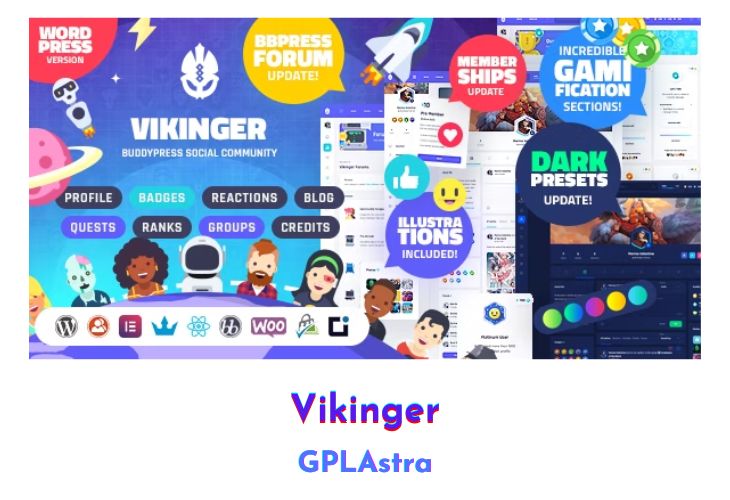
Vikinger – BuddyPress and GamiPress Social Community Theme is a meticulously designed WordPress theme aimed at creating a vibrant and interactive online community. This theme integrates seamlessly with BuddyPress, extending its capabilities with features like reactions, media sharing, and extensive profile management. Additionally, it incorporates a comprehensive gamification system through GamiPress, offering badges, quests, credits, and ranks to enhance user engagement and interaction. With a focus on detailed design elements, Vikinger ensures that every aspect of the community experience, from profiles to newsfeeds, is visually appealing and user-friendly.
The theme offers a rich array of features, including highly customizable profile pages with sections for about, images, badges, quests, and posts. The status update functionality is revamped to allow for easy uploading of photos, GIFs, and videos. Users can express themselves through a unique set of post reactions and share posts seamlessly. Gamification is a core aspect, with badges, quests, credits, and ranks that users can unlock and display. Vikinger also includes a complete blog section with different views and post types, enhanced with reaction capabilities. The inclusion of detailed illustrations, SVG icons, and avatars ensures that users can personalize their experience fully.
| Name | Vikinger |
| Type | WordPress Theme |
| Version | 1.9.40 |
| File Name | vikinger |
| File Type | rar (Archive, please extract before use) |
| File Host | mediafire.com | Mirror |
| Updated On: | 6 months ago |
Core Features of Vikinger WordPress Theme
- BuddyPress Integration:
- Enhanced with reactions, shares, and media
- Gamification with GamiPress:
- Badges
- Quests
- Credits (Gold, Gems, Emeralds)
- Ranks
- Super Detailed Design Elements:
- Carefully crafted pages
- Included PSDs for illustrations and elements
- Complete Profile & Newsfeed Pages:
- Full profile sections (about, images, badges, quests, posts)
- Community pages (newsfeed, profile settings, members, groups directory)
- Revamped Profile Status Updates:
- Upload photos, GIFs, post status updates, edit posts, link YouTube videos
- Pin, favorite, and private post options with custom icons
- Post Reactions:
- 8 reactions: Like, Love, Dislike, Happy, Funny, Wow, Angry, Sad
- React to profile posts, comments, and replies
- Share Functionality:
- Share friend’s activities or own posts with a status update box
- Gamipress Badges:
- Unlock badges and earn credits
- Display badges with a profile widget
- Customizable badge designs (PSD included)
- Gamipress Quests:
- Complete quests to earn credits and ranks
- Display quests with a profile widget
- Customizable quest medals (PSD included)
- Gamipress Credits:
- Three credits: Gold, Gems, Emeralds
- Unlock ranks and level up
- Display credits with a profile widget (PSD included)
- Gamipress Ranks:
- Six ranks system
- Linked rank progress to profile avatars
- Customizable rank shields (PSD included)
- Blog Page:
- Three views: list, small grid, big grid
- Post types: standard, video, audio, gallery
- Reaction integration for blog posts
- Illustrations, SVG Icons, and Avatars:
- PSD files for illustrations and elements
- Included SVG icons and 16 avatars (15 people, 1 smiley)
What’s New (Changelog) in Vikinger v1.9.40
AUG 27, 2025 - v1.9.40 General
Updated theme to latest version of plugins.
Comments
Fixed an issue that could cause the comment user avatar to display with a wrong offset.
The backend Settings > Discussion > Enable threaded (nested) comments option is now correctly used when displaying comments.
The backend Settings > Discussion > Number of levels for threaded (nested) comments option is now correctly used when displaying comments.
Sales Page and Live Demo of Vikinger WordPress Theme
https://themeforest.net/item/vikinger-buddypress-and-gamipress-social-community/28612259
Free Download Vikinger Latest Version
⚡ Premium Access
Unlock All Premium Features
Unlimited Downloads
No Restrictions
Direct Download Links
Access to Private Content
Frequently Asked Questions (FAQs):
Here are some frequently asked questions related to Vikinger WordPress Theme that might help you while installing it on your WordPress site:


