XTRA v5.5 WordPress Theme
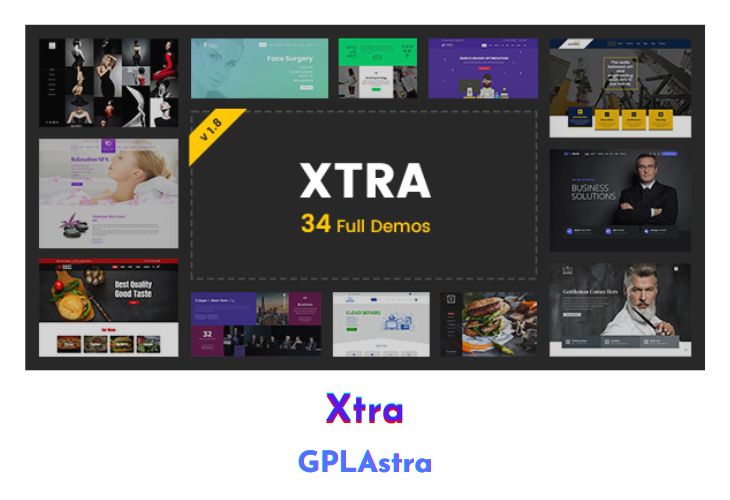
XTRA is a dynamic and versatile WordPress theme designed to cater to the needs of creative individuals, designers, and freelancers seeking a visually stunning online presence. Boasting a responsive and live drag-and-drop interface, XTRA simplifies website creation with its easy-to-use features. The theme collaborates with top designers, resulting in visually striking designs that showcase creative passion.
With an array of customization options, XTRA allows users to tailor their websites to their unique preferences, from colour schemes and typography to layout and sidebars. The theme offers an impressive selection of over 100-page builder elements, 200+ premium templates, and 500+ presets for elements, providing a rich toolkit for crafting distinctive online experiences.
| Name | XTRA |
| Type | WordPress Theme |
| Version | 5.5 |
| File Name | xtra |
| File Type | rar (Archive, please extract before use) |
| File Host | mediafire.com | Mirror |
| Updated On: | 2 months ago |
Core Features of XTRA WordPress Theme
- Easy Installation & Demo Import: Simplify the setup process with a 1-click demo importer and step-by-step installation video tutorial.
- Drag & Drop Page Builder: Enjoy live front-end drag-and-drop functionality, classic back-end editor, and a wealth of page builder elements.
- Live Theme Options & Customization: Tailor your website with options for theme color schemes, layout, sidebars, typography, and a vast library of 875+ Google Fonts.
- Unlimited Backgrounds: Choose from unlimited background options for boxed and wide modes, per page or post, and leverage global theme options for consistent backgrounds.
- Header and Footer Customization: Modify header and footer elements, including social icons, background images, and styling options for various elements.
- Blog Settings: Customize blog layouts, title, breadcrumbs, and styling for each widget.
- Navigation and Design Control: Take charge of your website’s design with options to enable or disable page title bars, adjust margins, control drop-down menus, and more.
- Back To Top Button: Easily enable or disable the Back To Top button via theme options.
- Footer Styling: Control the color and style of each section of the footer, including text shadow, social icons, and copyright bar customization.
What’s New (Changelog) in XTRA v5.5
v5.5 - [1 Jan 2026]
Compatibility with WooCommerce 10.4.x
Compatibility with Elementor v3.34.x
Compatibility with WPBakery 8.x
Added advanced WP Text Editor for category and tags descriptions
Added thumbnail support for posts category and tag taxonomy archives
Added four positions and photo gallery support for the marquee element
Added caching system for sidebar and footer widgets HTML output
Added render delay components settings, improving site speed & performance
Added quick featured image set/remove buttons for all post types
Fixed WooCommerce variation change issues in the quick view popup
Fixed WooCommerce duplicated gallery items in the single product carousel
Fixed WooCommerce hover effects on both gallery and single featured images
Fixed WooCommerce form notification message issues on the My Account page
Fixed WooCommerce product gallery order on RTL websites
Fixed WooCommerce widget styling for categories and attributes
Fixed WooCommerce attribute active selection color inconsistency
Fixed WooCommerce sticky add to cart product title when the page title is disabled
Fixed WooCommerce quantity input issue on grouped products
Fixed video post format issues, specifically YouTube iframe output
Fixed Mega Menu center and reverse mode positioning on RTL websites
Fixed Demo importer RTL sites styles in widgets, menus and page settings
Fixed Elementor default kit post_title error when uninstalling demos
Fixed Contact Form 7 reinitialization issues in off-canvas and popup layouts
Fixed menu indicator icon visibility when using custom HTML as a mega menu
Fixed menus with droprodnw custom three dots placeholder for Google CLS
Fixed demo importer issues on newer PHP versions
Fixed uninstall demo button and modal JavaScript issues
Fixed StyleKit number inputs issue with keyboard/mousewheel on first load
Fixed Google Maps JavaScript's wrong multiple API calls
Fixed missing or wrong WordPress images alt and title attribute output
Fixed set issue for the home page after multiple imported demos
Fixed Theme options live preview changes issue with WP 6.8.x
Fixed Magic mouse issues and Hide default cursor option CSS issue
Fixed Cookie notice position for mobile and tablet
Fixed Gallery fitRow layout auto fit row issue on mobile
Fixed Caching of the custom StyleKit selector and output issue
Fixed & Removed unwanted links and unused shortcodes from posts excerpt
Optimized JS/CSS files and reduced widget/element CSS by up to 40 KB
Optimized database autoload calls and disabled all theme autoloads
Optimized database tables for posts, pages, terms, and menus meta settings
Improved the theme file size and reduced its size by up to 250 KB
Improved the Codevz Plus plugin and reduced its size by up to 650 KB
Improved theme performance, making it 2× faster than previous versions
Improved all premade-demos styles on Desktop for both English and RTL
Reduced DOM size elements by up to 20% in frontend and 10% in the backend
Updated plugins and language files
Sales Page and Live Demo of XTRA WordPress Theme
https://themeforest.net/item/xtra-responsive-multipurpose-wordpress-theme/20715590
Free Download XTRA Latest Version
⚡ Premium Access
Unlock All Premium Features
Unlimited Downloads
No Restrictions
Direct Download Links
Access to Private Content
Frequently Asked Questions (FAQs):
Here are some frequently asked questions related to XTRA WordPress Theme that might help you while installing it on your WordPress site:


